Sunday, January 17, 2016

Memory as a Service and Apache Spark

Apache Spark is quickly crowding out MapReduce as the framework for orchestrating data analytics on compute clusters like Hadoop.  It's much faster (~100x), requires less disk storage and throughput, is more resilient, and is easier to code for.

MapReduce accomplishes speed and resiliency by sending 3 copies of each piece of data to 3 different nodes.  Each node writes it to disk and then starts working, which means you're tripling the disk writes and tripling the space required to do a job.  One way to solve this is to use direct-attach storage arrays: you can connect 4+ Hadoop nodes to one array and then send only 2 copies of each piece of data, relying on the storage array's RAID protection for a layer of protection.  This also allows you to scale capacity and performance as needed.  Data storage companies see this architecture as their way to contribute and sell to the Big Data industry.

Source
But here comes Spark, which has "Resilient Distributed Datasets," essentially data parity so that you can always reconstruct the missing data if a node goes down.  Think erasure coding.  Since the data has a layer of resiliency built in, writing to disk isn't needed, and the work can be done in RAM.

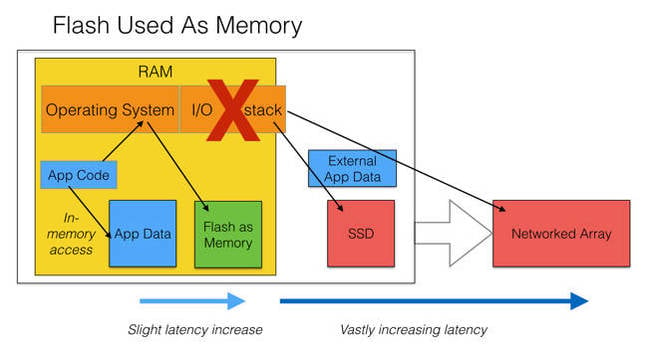
This basically eliminates today's value proposition of data storage companies.  But it does require a bunch more RAM, which is expensive.  I'm starting to see potential for the Flash As Memory Extension developing market: connect an all-flash or 3dxpoint array to several nodes and you have a slower but much cheaper way to run Spark.  For use cases that don't need the blazing speed and have cost constraints, that could work well.

Memory as a shared resource...looks like we're heading toward a Memory as a Service model similar to RAMcloud!

Thursday, January 14, 2016

Developing Memory Trends

There are a few new types of memory breaking onto the scene that are reportedly going to change the world.  The trick to bringing a memory technology to the commercial market today is nailing all 4 key properties: fast, dense, non-volatile, and inexpensive.  
  1. Normal DDR3 DRAM is fast (6-20 nanoseconds) and dense, but volatile and expensive at $50/GB for enterprise server DRAM.
  2. NAND flash is dense, non-volatile, and inexpensive (~$5/GB for enterprise SSD), but it's nowhere near the speed of DRAM at >50,000 nanoseconds. 
  3. Memristors sound amazing, but they don't exist yet and likely won't in the next 5 years.  
  4. 3D Xpoint appears to be the the only viable option right now.  Intel and Micron report it is:
    1. Fast: 1,000x faster than Flash would mean 50 nanosecond range.
    2. Non-volatile
    3. Up to 50% less expensive than DRAM
    4. 10x denser than DRAM
Importantly, 3Dxpoint is reported to be durable.  One of the drawbacks of Flash is writes cause damage to it over time, so if you start with a 1TB disk after 4 years you may have a 200GB disk.  To solve this, manufacturers pack up to 6x the needed amount of Flash into an SSD so when an area goes bad, the SSD just allows you to write to a brand new area of the disk.  This does two bad things: drives up cost and drives down performance. 
"We show that future gains in density will come at significant drops in performance and reliability. As a result, SSD manufacturers and users will face a tough choice in trading off between cost, performance, capacity and reliability."  Source
If 3dxpoint delivers on its promises, there will be several huge impacts.
  • All-3dxpoint arrays.  Today's storage operating systems will need to be completely re-written as they are simply not capable of going from 50,000ns disk latencies to 50ns.  
  • All systems will have more memory.  At 50% the cost of DRAM, rather than spend less money on memory we'll probably just spend the same money on 2x the amount of memory.
  • Because you'll have 2x the memory, operating systems will need to be re-written.  Our current OS's are designed around the cost constraints of memory gradually declining according to Moore's law.  3dxpoint would thrust us forward along that line and require serious software engineering to take advantage of it.
  • Since it's non-volatile, operating systems will need to be re-written.  Lose power?  Start right back where you left off.  This means you wouldn't be able to resolve an application/OS freeze-up with a hard reboot as well.
  • FaME (Flash as Memory Extension) will give way to 3dxpoint as Memory Extension and accelerate the trend rapidly.  The cost of 3dxpoint ($25/GB?) make a strong case for the shared-resource model of today's data storage industry, while the performance and non-volatility feature would be the succession of SAP HANA's "database in memory" architecture (and IBM's Spark, too).  
DRAM's performance advantage over 3dxpoint probably means DRAM won't go away in the enterprise.  Rather, 3dxpoint would be another tier of memory, below DRAM and above disk, with DRAM mirrored to the 3dxpoint for its non-volatility.  

Wednesday, January 13, 2016

Top of Rack Flash and FaME


One developing topic is Flash as Memory Extension, or FaME.  With flash becoming cheaper and cheaper and CPU's getting faster and faster, there's an architectural bottleneck to solve: there's a huge performance gap between the DRAM and the SAN.  

FaME tries to solve this by accessing SSDs in way that mimics access to RAM, skipping the SCSI stack and driving down latency.  This begins to close the DRAM-SAN gap, achieving latencies in the 500-900ns range.  There are a whole host of ways to accomplish this.
  • NVMe is one, essentially a PCI-slot compatible SSD.  Pop it in a server and it acts like DRAM.  The disadvantage here is you've re-introduced the problems the SAN/NAS was introduced to solve: stranded capacity, lack of data protection features (snapshots, replication), and you'll need to come up with a way to make this NVMe available to multiple nodes for parallelization and redundancy. Think Fusion-IO, which also required significant re-coding of applications.
    • RoCE Infiniband has port-to-port latencies ~100ns
    • RoCE Ethernet has port-to-port latencies ~230ns and RoCE v2 is routable.  This is a link-layer protocol, however RoCE v2 is not supported by many/all OS's yet. 
  • iWARP is a protocol that allows RDMA wrapped in a packet for a stateful protocol like TCP.  
  • Memcached is an open-source way for your servers to use other servers as DRAM extension.  I'm a bit fuzzy on whether it simply uses the second server as a place to put part of your current working set or if it offloads portions of the computation as well.  In any case, here's a good explanation.
  • HDFS, key value store semantics and other protocols: this may be the smartest way to do things, just let the application speak directly to a storage array the same way it would speak to RAM.  
Currently the fastest all flash SAN/NAS arrays have latencies in the 100,000-200,000ns range.  This is miles away from the DRAM, which is in the 6-20ns range.  FaME is aiming for 900ns.  Architectures like HANA and Spark try to solve this by putting the entire workload in DRAM, which is expensive and means that a power outage requires long process of re-loading the data from disk into DRAM.  
Courtesy of http://www.theregister.co.uk/2015/05/01/flash_seeks_fame/

Looks like FaME will be a good price/performance solution until we develop a super-cheap static RAM.


Wednesday, January 6, 2016

CDOT 8.3.2: What's New

The next release of our ONTAP operating system, CDOT 8.3.2, is expected to have several key features and is expected February-ish. 8.3.2RC2 is already out!  Here’s what’s new:

1) Inline Dedupe: supported on All-flash and FlashPool enabled systems.  This feature reduces the transactions to disk and reduces storage footprint by deduping in-memory.
    a. Enabled on all-flash arrays by default
    b. Uses 4k block size and stays deduped when replicated.
    c. Syntax: volume efficiency modify -vserver NorthAmerica -volume /vol/ production-001 -inline-deduplication true

2) QOS (adjustable performance limit) is now supported on clusters up to 24 nodes (up from 8 nodes)!

3) Support for 3.84TB TLC SSDs.  These huge flash drives have a lower cost per GB than smaller SSDs.  They also require lower power consumption (85% less) and lower rack footprint (82% less RU) than a same-performance HDD array.

4) Static Adaptive Compression: in 8.3.1 we introduced a high-efficiency compression algorithm for inline compression.  8.3.2 gives you the ability to run this algorithm on an existing volume or dataset.
    a. This is important for when you do a vol move from a system without inline compression enabled to one with it enabled, for example from a HDD FAS to an all-flash FAS.

5) Copy Free Transition: This feature allows you to shut down a 7-mode cluster and hook the disk shelves into a CDOT system.  The data is converted to CDOT, vfilers are converted to vservers, and in a 2-8 hour window the entire 7 to C migration is complete.

6) Migrate a volume between vservers: the equivalent of vfiler move, this allows you to re-host a volume between vservers.  This only works once, and only for volumes transitioned from 7-mode.

7) Inline Foreign LUN Import: Migrate FCP data by presenting the LUN at the NetApp controller, and NetApp then presents the LUN to the host.  In the background, NetApp will copy the data over and then you can retire the old system and LUN.  This is vendor-agnostic as of 8.3.1 and works for All-Flash FAS in 8.3.2.

8) SVM-DR MSID replication.  SVM-DR allows you to replicate an entire vserver and all its configuration for a push-button disaster recover.  MSID’s are the unique identifiers for volumes, and replicating them allows applications like VMware to accept the DR exports without re-mounting them, greatly shortening your RTO.

9) Audit Logging enhancements: records login failures and IP addresses of logins.

Read more at 8.3.2RC2 release notes: https://library.netapp.com/ecm/ecm_get_file/ECMLP2348067

Tuesday, November 17, 2015

CDOT Tips: InterCluster LIFs

When you see ICL or “InterCluster LIF,” think SnapMirror/SnapVault.  ICL’s are interfaces totally dedicated to replication between clusters, that’s all they can do.  Here’s a couple important things to think about:

1.       There are two kinds of replication in CDOT:
a.       IntraCluster: this means volume move from one node to the other within the cluster.  This occurs using SnapMirror via the private 10Gb cluster network.
b.      InterCluster: This means SnapMirror or SnapVault to another cluster, which occurs over TR’s shared network.
2.     All of a cluster’s SnapMirror and SnapVault to other clusters only occur via the ICL’s. 
3.       ICLs work on two kinds of ports: Role=Data or Role=InterCluster.  Remember, you can assign a role to a port so that only LIFs with compatible roles will ever land there.


4.       Create at least 1 ICL per node.  ICL’s can’t be failed over between nodes, they are dedicated to that node.

5.       In 8.2, a node’s ICL’s can only be in a single network.   In 8.3 IPSpaces are re-introduced and allow multiple ICL’s in multiple IPSpaces per node.

Tuesday, October 6, 2015

CDOT Tips: Network Troubleshooting

Here are some essential commands for digging into your CDOT network configuration:


How to show the status of your physical and virtual ports:
>net port show –node node1
Node   Port   Role         Link   MTU Admin/Oper  Admin/Oper Admin/Oper
------ ------ ------------ ---- ----- ----------- ---------- ------------
eg-si-clsn-e01-h02
       a0a    data         up    1500  true/-     auto/full   auto/10000
       a0a-2003
              data         up    1500  true/-     auto/full   auto/10000
       a0b    data         down  9000  true/-     auto/-      auto/-
       e0M    node-mgmt    up    1500  true/true  full/full   auto/1000
       e0a    cluster      up    9000  true/true  full/full   auto/10000
       e0b    data         up    1500  true/true  full/full   auto/10000
       e0c    cluster      up    9000  true/true  full/full   auto/10000
       e0d    data         up    1500  true/true  full/full   auto/10000


How to show detailed info of a specific port:
>net port show –node node1 –port a0b
                         Port: a0b
                           Role: data
                           Link: down
                            MTU: 9000
Auto-Negotiation Administrative: true
   Auto-Negotiation Operational: -
     Duplex Mode Administrative: auto
        Duplex Mode Operational: -
           Speed Administrative: auto
              Speed Operational: -
    Flow Control Administrative: full
       Flow Control Operational: -
                    MAC Address: 02:a0:98:5b:40:17
              Up Administrative: true
                      Port Type: if-group
    Interface Group Parent Node: -
    Interface Group Parent Port: -
          Distribution Function: ip
                  Create Policy: multimode_lacp
               Parent VLAN Node: -
               Parent VLAN Port: -
                       VLAN Tag: -
               Remote Device ID: -

How to show the MAC addresses of all your ports:
>port show -node  node1 -fields mac
node               port mac
------------------ ---- -----------------
eg-si-clsn-e01-h02 a0a  02:a0:98:5b:40:16
eg-si-clsn-e01-h02 a0a-2003 02:a0:98:5b:40:16
eg-si-clsn-e01-h02 a0b  02:a0:98:5b:40:17
eg-si-clsn-e01-h02 e0M  00:a0:98:5b:40:2a
Note that when you create an ifgrp in 8.2.x, the member ports will inherit the MAC address of the ifgrp.  E.g., a0a will have the same MAC as e0a and e0c. 


How to ping from a specific LIF:
  If you use the ping command, there’s no obvious way to see which port or LIF it’s emitting from.  You can use this command to specify which node or LIF you want to test:
>Network ping –node node1 192.168.10.10
>Network ping –lif-owner vserver1 –lif nfs_data_lif
There are also some cool options like number of packets, allow fragmentation, etc.

How to turn up/down a port:
>set advanced
> network port modify –node node1 –port e0a –up-admin true

How to list who your port is connected to:
>node run -node node1 -command cdpd show-neighbors


Tuesday, September 15, 2015

CDOT Tips: Replication

Following the “Data has mass” train of thought, here’s how we move and protect data in CDOT.  We have three types of replication:
  •           SyncMirror: Synchronous replication.  For redundancy.
  •           SnapMirror (DP): Replication to a 1-minute granularity.  For disaster recovery.
  •           SnapVault (XDP): Replication to a 1-hour granularity.  Think backups.


In CDOT we’ve simplified the commands and protocol: to create a SnapVault relationship, you run “SnapMirror create –type XDP.”  To create a SnapMirror relationship, you run “SnapMirror create –type DP.”  Here’s an example of setting up SnapMirror via CLI.

vs2::> snapmirror create -destination-path vs2:dept_eng_dp_mirror2 -source-path vs1:dept_eng -type DP

The primary distinction between DP SnapMirror and XDP SnapMirror is that SnapVault allows you to keep more snapshots on the destination.  Essentially, XDP SnapMirror is for long-term backups.  Other differences:
  •           DP SnapMirror relationships can be reversed (swap destination and source)
  •           DP SnapMirror can replicate every minutes, XDP SnapMirror once per hour.
  •           DP SnapMirror destination volumes can be made read/write.


Do you have some datasets that would benefit from a quicker time to recovery or have stricter SLA’s?  If so, DP SnapMirror is the best choice.    Now, with many systems and many volumes being replicated, how do you keep track of it all?  In our no-cost tool OCUM 6.0, there is a “Protection” tab that allows you to setup, change, remove, restore, and monitor all your replication relationships. 


Because ONTAP is our single-platform operating system, this also means you can replicate to the cloud (Cloud ONTAP in AWS or Azure), to an all-SATA NetApp “backup” system, or any other NetApp you have.  This “ONTAP everywhere” ubiquity is part of why ONTAP manages more exabytes than any other storage operating system in the world.